During the app development process, I often encountered a common problem: having a product idea but struggling to quickly turn it into a presentable interface.
For entrepreneurs, product managers, and indie developers, UI design often demands significant time and resources. In the past, creating a complete prototype—spanning requirement discussions, style definition, and page revisions—usually took a long time.
Before trying Sleek, I also believed that professional app UI design required a dedicated design team. However, I discovered that AI design tools can rapidly generate professional-looking mobile interfaces based on simple requirement descriptions, helping to validate and launch products faster.
From Idea to Interface: AI Transforms App Prototyping
Previously, when creating app prototypes, I would typically organize a feature list first, then explain the product positioning, target audience, and desired visual style to the designers.
The issue was that early-stage product ideas often weren’t fully mature, making it difficult to articulate requirements accurately right from the start.
For instance, if I wanted to design a fitness app, it needed to include:
- A user registration page;
- A workout plan page;
- A data tracking page;
- A user profile page.
The traditional approach involved sketching the functional structure, designing page layouts, and then endlessly tweaking the visuals.
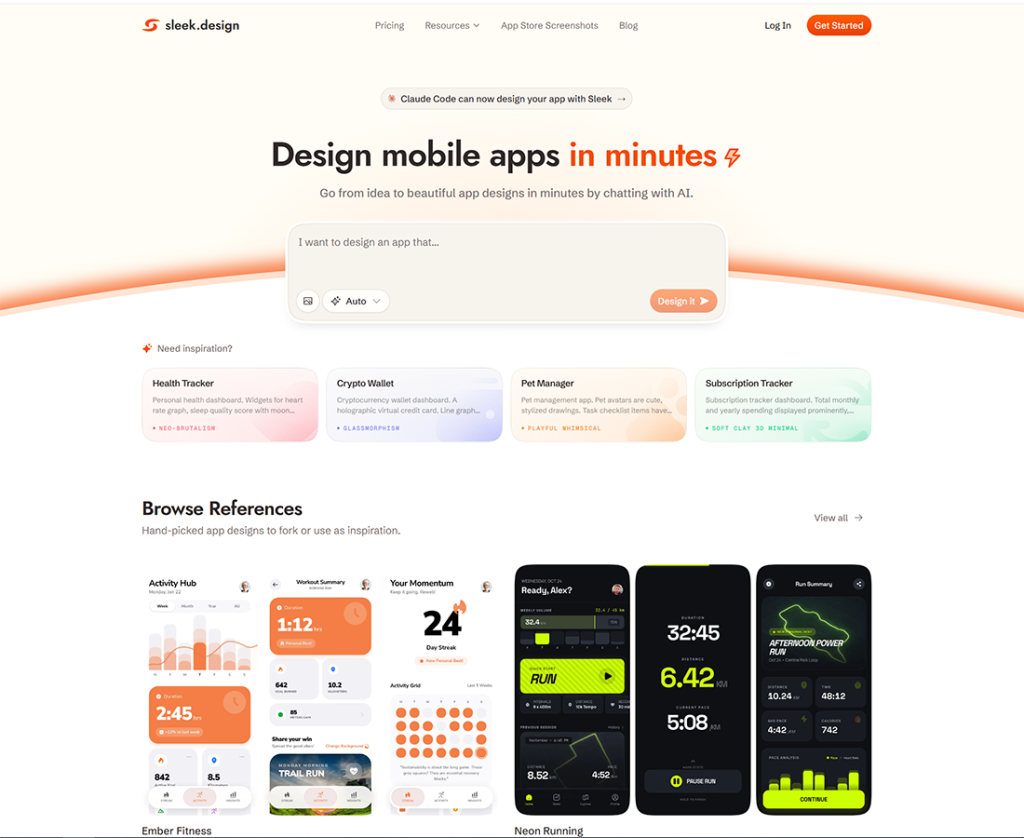
With Sleek, the process is much more direct. I simply describe my product requirements—such as the app type, target audience, desired features, and overall style—using natural language, and the AI generates corresponding interface concepts.
What struck me most about this method is that design is no longer a phase requiring a long wait; instead, it becomes an integral part of rapidly validating ideas.
Create Professional App Interfaces Quickly—Even Without a UI Designer
For startup teams, limited resources are often a major challenge.
In the early stages of a product, a team might consist of only:
- A founder;
- A product manager;
- One or two front-end developers.
Hiring a dedicated UI designer might not be the best option in such cases. However, the absence of a designer doesn’t mean the product has to settle for a crude or basic interface.
After using Sleek, I found it helps quickly establish a complete visual framework for the app, covering page layouts, component designs, and the overall stylistic direction.
Compared to designing pages from scratch, AI-generated concepts provide a more professional starting point. This is particularly valuable for those without a design background. Many products fail not because their features are lacking, but because they fail to convey their value to users during the presentation phase. A clear, aesthetically pleasing interface that aligns with user habits helps a product effectively showcase its core functionality.
Rapidly generate iOS and Android app designs to boost product validation efficiency
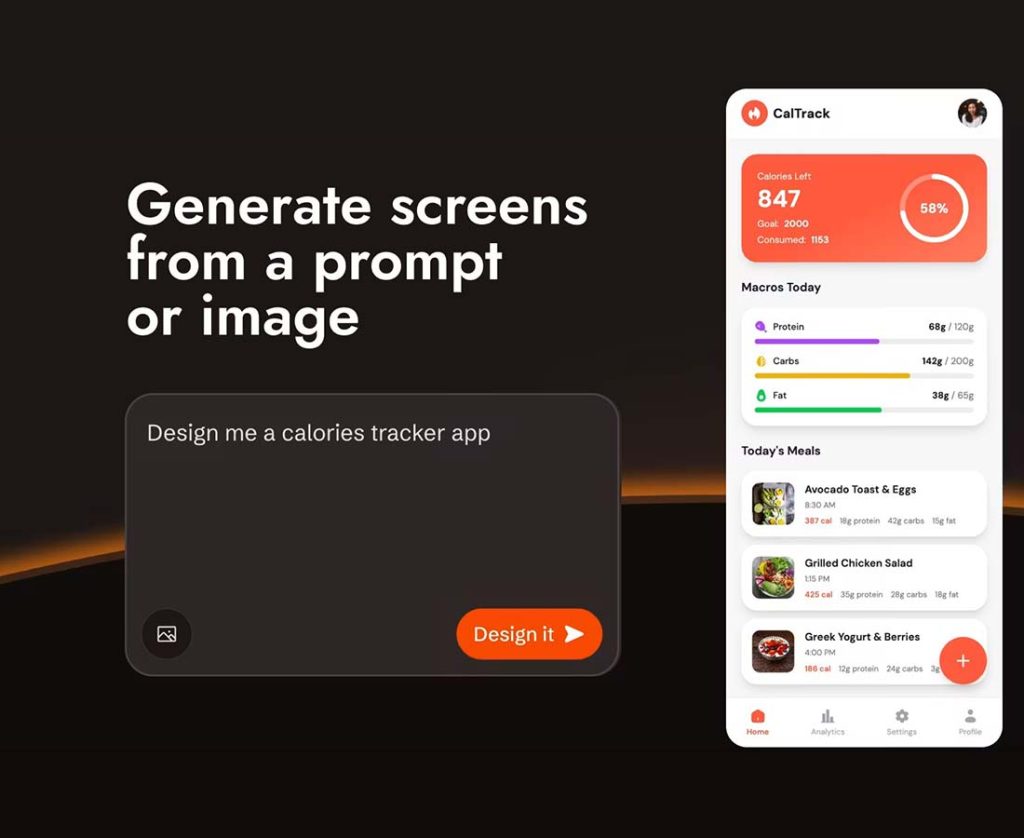
When developing mobile applications, there are distinct differences in user habits between iOS and Android platforms. Historically, accommodating interface designs for both platforms simultaneously would significantly increase design costs.
Sleek excels at rapidly generating mobile-ready UI designs based on specific app requirements, allowing product teams to visualize the final result much sooner.
For me, the greatest benefit isn’t just generating a few pages, but quickly establishing a complete product experience.
For instance:
How should the home page be laid out?
Where should feature entry points be placed?
Is the user workflow logical?
These questions can be addressed early on through the generated prototypes. Before actual development begins, teams can discuss and refine the design based on the prototype, thereby minimizing the need for repetitive adjustments later in the development cycle.
From design prototype to development: Bridging the gap between design and code
Communication gaps between design and development teams have long been a challenge. Once designers finished the page layouts, developers had to interpret the design specifications and manually translate them into code.
This process often led to issues such as:
- Discrepancies between the actual page and the original design;
- Redundant component development;
- High costs associated with modifications.
Sleek solves this by supporting exports to editable Figma files and code formats like React, Flutter, and HTML, ensuring a smoother handoff between design and development.
For developers, this means a faster transition from visual concepts to actual coding. For product managers, it offers a more convenient way to demonstrate the product direction to technical teams. I believe this integration of design and development represents one of the greatest values of AI tools; it not only assists with the design process but also shortens the journey from concept to realization.
Ideal for entrepreneurs, product managers, and development teams
Based on my experience, Sleek is particularly well-suited for several types of users.
First, entrepreneurs.
In the early stages of a startup, many founders have product ideas but lack a full design team. Using AI to generate app prototypes allows them to quickly create demos for investor presentations, user testing, or internal discussions.
Second, product managers.
Product managers often need to coordinate between design, development, and business teams. The ability to rapidly create visual prototypes enables them to articulate product requirements more clearly and improves communication efficiency. The third group is front-end developers.
Developers sometimes encounter situations where the functionality is clearly defined, yet a design plan is missing. AI design tools can help quickly generate interface references, thereby accelerating the development workflow.
For UI designers, Sleek serves as a helpful tool for rapidly exploring design directions and generating initial concepts, which can then be refined in greater detail.
AI design tools do not replace design work; they enhance efficiency
When I first encountered AI design tools, I was concerned about whether they might undermine the value of professional design. However, after using them, I believe AI primarily boosts efficiency rather than completely replacing the design thought process. Excellent product design still requires an understanding of user needs, brand positioning, and usage scenarios.
AI can assist with:
- Generating initial interfaces;
- Exploring design directions;
- Structuring page layouts;
- Rapid prototyping.
Human experience, meanwhile, drives final decision-making and refinement. This combination makes the design process more flexible.
Small teams can leverage AI to achieve efficiency levels comparable to professional design teams, while professionals can reduce repetitive tasks and focus more energy on creating superior user experiences.
Create professional app prototypes quickly—even without a UI designer
Competition in app development is intensifying, and speed and user experience have become critical factors for product success. In the past, high-quality UI design often required significant time and resources; today, AI design tools are simplifying this process.
By using AI to generate mobile app interfaces, Sleek helps entrepreneurs, product managers, and development teams rapidly create prototypes and bridge the gap between design and development.
From a simple product idea to a complete iOS or Android interface—including editable design files and code output—AI is helping more people shorten the distance between creative concepts and real-world implementation.





+ There are no comments
Add yours