I have been testing various network tools for quite some time. In the past, my understanding of VPNs was relatively simple. I thought they were mainly used to change your IP address and connect to servers in other countries. However, after using VPN software continuously for a while, I realized that whether a VPN is worth using long-term depends on much more than the number of servers it offers. Connection speed, stability, ease of use, and protection when the network connection encounters problems are all equally important. That is why I decided to test PureVPN specifically and evaluate its performance from the perspective of everyday use.
First Impressions: Easier to Use Than I Expected
When I test software, the first thing I usually pay attention to is not speed but how easy it is to install and configure. A VPN is something that users may need to turn on at any time, so having to adjust complicated settings every time can quickly become frustrating.
The PureVPN interface is fairly intuitive. After installation, I could quickly find the connection button, server selection options, and settings. During my first test, I used the automatic server selection option. Once connected, the software clearly displayed the connection status. I then tried manually selecting servers in different regions, and the entire process was straightforward.
I found this design practical. Casual users can simply click the connection button, while those who need to test different regional network environments can manually select a server according to their needs.
Speed Performance: Server Distance Matters
Speed is probably one of the biggest concerns when using a VPN. Because network traffic has to pass through a VPN server, connecting to a server that is far away or experiencing heavy traffic can result in slower page loading or video buffering.
When testing PureVPN, I did not rely on just one test. I connected to different servers at different times and used them for regular browsing. I first selected servers that were relatively close to my location and tested websites, search engines, and image-heavy pages. Overall, the experience was smooth, and I did not notice any significant lag during normal browsing.
I then connected to servers located farther away. As expected, latency increased and some pages took slightly longer to respond. However, this is not a problem unique to PureVPN. VPN performance is affected by several factors, including server distance, local network conditions, routing quality, and server load.
For this reason, I focused more on overall stability than on achieving the highest possible speed in a single test. Based on my experience, PureVPN performed consistently well for regular web browsing and video streaming. When I selected servers that were relatively close, the impact on everyday use was not particularly noticeable.
Multiple Server Locations: Convenient for Testing Different Network Environments
When I test software, I often need to understand what users in different regions may experience, so having a choice of server locations is important to me.
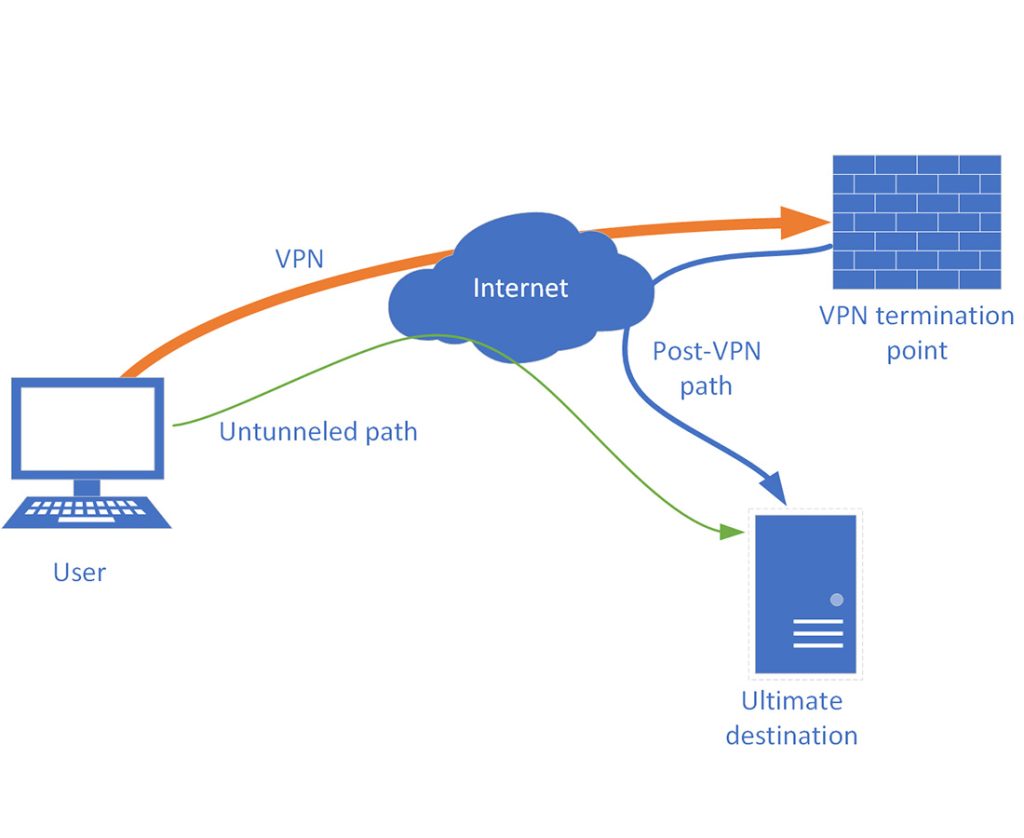
PureVPN provides servers in multiple countries and regions, allowing me to change my connection location according to my needs. During testing, I would connect to one region, use the connection for a while, and then switch to another. The process was relatively smooth.
However, I think it is important to have realistic expectations about regional switching. Connecting to a server in a particular country does not necessarily mean that every website will treat you exactly like a local user. Many platforms also consider account location, cookies, GPS data, and other information when determining a user’s region. Therefore, a VPN should not be considered a universal solution for bypassing every regional restriction.
For me, its more practical value is changing my network exit location while adding another layer of protection when using public networks.
Kill Switch: One of the Features I Value Most
During testing, I paid particular attention to what happens if the VPN connection suddenly drops. Many users focus only on whether a VPN can connect successfully, but the protection provided when the connection fails is equally important.
PureVPN includes a Kill Switch feature. If the VPN connection is interrupted, it can prevent the device from continuing to transmit traffic through the regular network connection, reducing the risk of accidentally exposing the real IP address.
I think this feature is particularly useful for people who frequently use public Wi-Fi in hotels, airports, coffee shops, and similar locations. After all, one of the main purposes of a VPN is to protect network connections, rather than simply changing an IP address.
Of course, enabling a Kill Switch can also have a noticeable side effect. If the VPN connection suddenly fails, the device may temporarily lose internet access. Therefore, whether to enable it depends on the user’s specific situation.
Split Tunneling: More Flexible for Everyday Use
Another feature I paid close attention to was Split Tunneling. In simple terms, not every application has to use the VPN connection. Some apps can continue using the regular network, while selected applications can be routed through the VPN.
I found this useful in everyday situations. For example, some local services do not require a VPN, and routing all traffic through a VPN could potentially affect their performance. At the same time, applications that require additional privacy protection can be configured to use the VPN connection.
I personally like this flexibility. When using a VPN for an extended period, there is no need for every piece of traffic to go through the VPN. Being able to adjust the connection according to different needs makes the overall experience more practical.
Mobile Experience: No Significant Burden in Everyday Use
In addition to testing the desktop version, I also tried PureVPN on mobile devices. Since so much of our online activity now takes place on smartphones, the mobile experience is just as important as the desktop experience.
The main functions on mobile are relatively straightforward. Connecting to a server, switching regions, and adjusting settings were all easy to understand. I used the VPN over mobile data for regular web browsing and information searches. When the mobile signal was strong, I did not notice any particularly significant impact on everyday use.
However, if the mobile network itself is already weak, enabling a VPN can make latency more noticeable. Therefore, the actual experience still depends heavily on the quality of the local mobile network.
Privacy Protection Is the More Important Role of a VPN
After testing it, I increasingly feel that the real value of a VPN is not simply whether it can “change your IP address,” but whether it can provide more reliable protection for everyday network connections.
For example, when I use public Wi-Fi at a coffee shop, hotel, or airport, I do not want my network connection to be exposed in an environment that may have many unknown users. By enabling PureVPN, network traffic can be transmitted through a VPN connection, helping reduce the risk of data exposure on public networks.
However, I would not consider a VPN to be a universal anonymity tool. Browser fingerprinting, cookies, account logins, device information, and other factors can still allow websites to identify users. Therefore, in my view, PureVPN is better understood as one component of an overall privacy strategy rather than the only solution to every online privacy concern.
My Experience
After testing it continuously, I have a fairly positive overall impression of PureVPN. The software is easy to operate, provides a wide selection of server locations, and includes useful features such as Kill Switch and Split Tunneling. For first-time VPN users, connecting to a server is straightforward, while more experienced users have additional options for customizing their connection.
Of course, it is not without limitations. Speeds and latency can vary between servers, and connecting to servers that are farther away generally results in higher latency. Some websites and streaming platforms may also actively restrict VPN IP addresses.
Based on my experience, however, PureVPN offers a solid overall experience if your main goals are protecting public network connections, changing your network exit location, testing different regional network environments, or adding another layer of privacy protection to everyday internet use.











+ There are no comments
Add yours